Peer Review History for OJS 3.5

OJS 3.5 plugin · Peer Review History Report

Proof of peer review for authors, one click away in OJS.

Reviewer assignments, comments, editorial decisions, and author revisions are compiled into one numbered PDF with QR verification. Authors download it themselves without having to contact the editorial office. Editors export a whole issue at once for national accreditation, such as SINTA/ARJUNA in Indonesia.

  • Reviewers stay anonymous in the author version
  • Not a single line of OJS core is changed
  • Authenticity can be checked by QR, without revealing review content
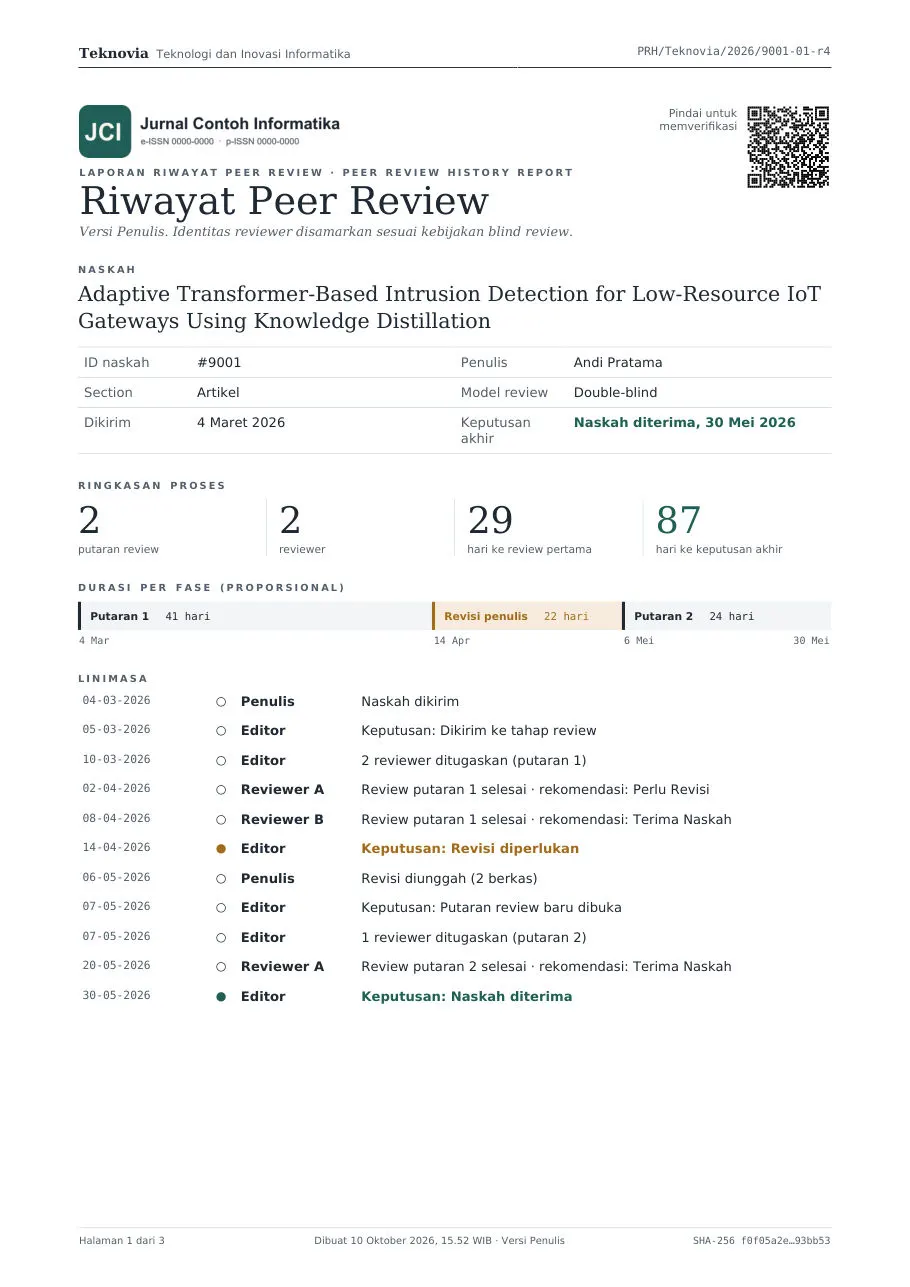
Review round detail page with reviewers labelled Reviewer A and B Cover of the Peer Review History Report: process summary, duration per phase, and timeline PRH/JOURNAL/2026/0123-01

What editorial offices deal with

The data is already in OJS. What's missing is one document that proves it.

The review trail is scattered across Review Details, Discussions, Editorial Decisions, and revision history. Every time proof is requested, the editorial office pieces it together again by hand.

"Could I get proof of the review process for my article? I need it for my promotion file."

Authors ask for proof

Lecturers need proof of correspondence and the review process for academic promotion or grant reports. Editors reply with screenshots and forwarded emails, one by one.

"Show us the peer review evidence for the articles in this issue."

Assessors ask per manuscript

Ahead of accreditation, journal managers open one manuscript after another to assemble a clean, consistent review trail.

"How do we know this document is genuine?"

Proof is easy to doubt

Screenshots and Word documents can be edited by anyone. Outside parties have no way to check their authenticity.

Last page of the report: discussion history, statement, Editor-in-Chief signature QR, and verification box
Last page: statement, signature QR, and verification box.

The report

The manuscript's entire journey, in one PDF report.

Arranged chronologically by review round, straight from the OJS records. Nothing is retyped.

  1. Cover and summary

    Title, submission ID, authors, section, review model, submission date, and final decision. Time statistics: days to first review and days to final decision.

  2. Duration per phase and timeline

    A proportional bar of review rounds and author revision periods, plus a timeline of every event: submitted, reviewers assigned, reviews completed, decisions.

  3. Round-by-round detail

    Assigned, accepted, due, and completed dates for each reviewer. Recommendations, comments, review form answers, editorial decisions with their email text, and revision files.

  4. Discussion history

    Review Discussions labelled by role: Author, Editor, or Reviewer A.

  5. Statement and verification

    The Editor-in-Chief's statement with a signature QR, the document number, a SHA-256 content fingerprint, and a QR code linking to the verification page.

Blind review privacy

Reviewers stay anonymous. Editors keep the full trail.

Every manuscript has two versions of the report. The Author version contains only what authors are already allowed to see in OJS; the plugin exposes no new data.

Author version Author version: reviewers labelled Reviewer A and B, names in comments replaced with a masked marker
For authors and outside partiesReviewers are replaced with labels. A reviewer name or email slipped into a comment automatically becomes [masked].
Editor version Editor version: reviewer names and affiliations, a reviewer who declined, and confidential comments for the editor
For internal auditsReviewer names and affiliations, reviewers who declined, confidential comments, and internal discussions.
What each version contains
ElementAuthor versionEditor version
Reviewer names and affiliationsLabels Reviewer A, B, consistent across roundsShown
Comments for the authorShown, reviewer identities maskedShown
Confidential comments for the editorNot includedShown
Review form answersOnly items marked for the authorAll items
Reviewers who declined or were cancelledNot includedShown
Reviewer attachment file namesReplaced with labelsOriginal names
DiscussionsOnly those involving the authorAll review-stage discussions
PDF file metadataOnly the journal name and document number, no personal names

Workflow

Every OJS role can access the information it needs.

Author

Self-service download, no need to contact the editors.

After the final decision, a Peer Review History panel appears on the author's submission page with a Download PDF button. The journal decides which outcomes unlock access: accepted, published, or also declined after review.

Peer Review History panel on the author's submission page with a Download PDF button (Indonesian interface)

Editor & Section Editor

Two buttons in the workflow, any time.

  • Download the Author or Editor version from the Review, Copyediting, or Production stage.
  • Review not finished yet? The report can still be generated, with a DRAFT watermark.
  • Every download is recorded in the submission's Activity Log: who, when, and which version.
Peer Review History panel in the editor workflow with Author version and Editor version buttons (Indonesian interface)

Journal Manager

One issue, one ZIP, ready for assessors.

Tools → Peer Review Reports. Pick an issue or a date range, then download a ZIP with a report for every reviewed manuscript and rekap.csv: ID, title, number of rounds, reviewers, dates, duration, decision, and document number.

Peer Review Reports page: ZIP export by issue or date range and a list of reports (Indonesian interface)

Tamper-evident

Anyone can check it, without opening the review content.

Assessors or university staff scan the QR code on the PDF. The public verification page shows only brief metadata and hashes.

Document number and random token
Configurable format, for example PRH/JICAI/2026/0123-01. The 32-character token in the verification URL cannot be guessed.
SHA-256 content fingerprint
Printed on every page. Anyone holding the PDF can match the file right in the browser; the file is not uploaded anywhere.
Automatic revisions
As long as the review data is unchanged, the same PDF is reused. When new records appear, a revision is issued under the same number with a -r2 suffix.
Revocation
Manuscript retracted? The Journal Manager revokes the report with a reason, and the verification page immediately shows REVOKED.
  • VALID
  • DRAFT
  • REVOKED
PDF check on the verification page: the file matches the issued report (Indonesian interface) Public verification page for a revoked report (Indonesian interface)

Installation

Simple: install it like any other OJS plugin.

The PDF and QR libraries are bundled. No Composer, no SSH access, no changes to OJS files. Works on shared hosting.

  1. Upload

    Website Settings → Plugins → Upload A New Plugin, then choose the .tar.gz file.

  2. Enable

    Tick the plugin in each journal that should use it. The report table is created automatically.

  3. Configure

    Optional: author access, number format, language, colour, statement, and signatory.

  4. Use

    The panel appears in the submission workflow, and the export menu appears under Tools.

Compatibility
OJS 3.5.0.x, PHP 8.2+
Plugin type
Generic plugin, enabled per journal
Languages
Indonesian & English (reports and interface)
Data
Read only, through the official OJS Repo/DAO layer
Storage
PDFs in your own OJS files folder
Guide
Illustrated user guide (Indonesian)

Pricing

Faster than assembling the review evidence for one issue by hand.

One price, every feature, for every journal in one OJS installation. Contact us to buy or to ask questions before you buy.

One-time paymentIDR 1,000,000/ OJS installation

  • Ready-to-upload plugin package
  • Valid for every journal in your OJS
  • Illustrated user guide
  • Reports and interface in Indonesian & English
Buy via WhatsApp → or call +62 821-1500-026

FAQ

Frequently asked questions

Can reviewer identities leak to authors?

The Author version contains only what authors are already allowed to see in OJS. Reviewers are replaced with labels such as Reviewer A and B, and any reviewer name, email, or username written in comments is automatically replaced with [masked]. Confidential comments for editors and reviewers who declined are left out. Initials or nicknames that are not in the reviewer's profile are not recognised, so still check the report before sharing it with outside parties.

Does the plugin modify OJS core?

No. The plugin only reads review data through the official OJS Repo/DAO layer and stores reports in its own table and folder. Disabling the plugin does not change any submission data.

Which OJS versions are supported?

OJS 3.5.0.x with PHP 8.2 or newer. The PDF and QR libraries are bundled, so Composer is not needed on the server.

How can third parties check that a report is genuine?

Scan the QR code on the PDF. The verification page shows the status (VALID, DRAFT, or REVOKED), brief metadata, and hashes. Anyone holding the PDF can match the file in the browser without uploading it. Review contents are never shown on the verification page.

Is there an Editor-in-Chief signature?

Yes, a signature QR above the signatory's name and title, with configurable content (for example name, title, and document number). It is a visual mark, not a certified electronic signature.

Can manuscripts reviewed before the plugin was installed get a report?

Yes. Reports are built from review data already stored in OJS, so older reviewed manuscripts can be downloaded right away. Manuscripts declined before review have no review data and therefore get no report.

How much is it, and does it cover multiple journals?

IDR 1,000,000 one-time for one OJS installation, valid for every journal in that installation, including an illustrated user guide.

Does the report rate the quality of the reviews?

No. The report records that the editorial process took place and was logged in OJS. This statement is also printed on the last page of the PDF.